Wednesday, November 30, 2016

Repository Pattern - Example

This is the continuation of the previous post. Here I will be discussing the approach I have taken to implement repository pattern in the same 2 page bank application, we have discussing in couple of previous posts.


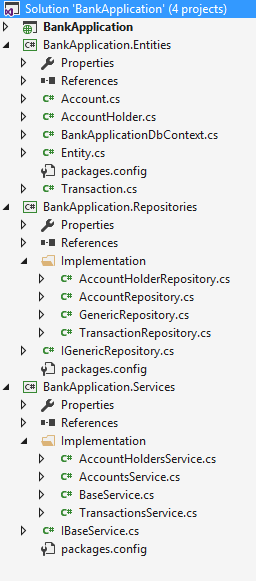
Except the Presentation Layer all the other projects are .net class library projects. Lets discuss each, one by one:

  • Entities Layer source code:
    • Define a base class Entity.
    • Make all the entity classes inherit from the calss Entity.
      • AccounHolder
      • Account
      • Transaction

    • Create context for all the entities
  • Repository Layer source code:
    • Create a generic interface called IGenericRepository

    • Create a generic repository called GenericRepository which implements IGenericRepository interface.

    • Make following repositories classes (which inherit from BaseRepository class) for each of the database entities.
      • AccoutHolderRepository
      • AccountRepository
      • TransactionRepository

  • Business Layer source code:
    • Create generic interface IBaseService Centralises Data Access logic or Web Service Access logic.

    • Create a generic base class which implements IBaseService interface created above and takes two generic parameter:
      • "T" for the entity type
      • "R" for the repository type
    • Create service class for each for database entities, and make them inherit the BaseService class created above.
      • AccountHoldersService
      • AccountsService
      • TransactionsService
  • Presentation Layer source code:
    • Below is the example of how the business layer is being called from Presentation layer 
In current application the database context is being moved to Repository Layer from Business Layer, now Business Layer can be unit tested by mocking repository. So now, we can confidently say, introducing Repository Layer between DAL and BL, removes the tight coupling between them. 


There is still an issue with this approach, if I want to introduce Unit of Work with Repository, it will be really hard to implement that. In my next post I will be refactoring this to use only the Generic Repository and will be covering, how Unit Of Work pattern can be used with Repository pattern to get rid of concurrency issues, that comes when multiple repositories are being used in a single transaction. 

PS: Repository pattern can be used with or without the Unit of Work pattern.

Repository Pattern

A mediator between Data Access Layer (a Database, a SharePoint list, or a web service) and Business Logic Layer of the application. It has following benefits:
  • Centralises Data Access logic or Web Service Access logic.
  • Repository introduces an abstraction layer between the DAL and BL, which makes BL unit testable by mocking the repository, which was difficult before due to tight coupling between the DAL and BL.


Implementation Approach: Repository pattern can be implemented using two approaches:

  • One Repository per entity– each entity of the database will have its own repository.
  • Generic Repository – One generic repository which will be used by all the entities of the database. 
Lets take the same bank application example from previous post and introduce repository pattern in it. I have used the mix of above two approaches, where 

  • I create an abstract generic repository that has the common behaviours which all the database entities support.
  • I also create one repository (which inherits from generic repository created above) for each entity of database.

The next post is going to show the source code details of this example.

PS: Repository pattern can be used with or without the Unit of Work pattern. 


Tuesday, November 29, 2016

Example: N-Tier Application

Problem Statement: It has two parts: 
  • Create a two page Bank Application where first page has two button one to add data into the database second to take you to the second page which shows the account details.
  • Each account holder has two accounts and each account has minimum 5 transactions.
 Solution Approach: We will be needing following items:
  • Two ASP.NET web pages.
  • Entities: AccountHolder, Account, Transaction. 
  • A way to do CRUD operation for items in Database.
Lets create n-tier application and divide above items into the different layers based on the previous post:
  • Entities Layer
    • Define POCOs 
      • AccountHolder.cs
      • Account.cs
      • Transaction.cs 
    • These classes represent Database tables as well as model for Presentation layer.
  • Data Access Layer
    • Use Entity Framework and define context to access database. (we are using Entity Framework code first approach) 
  • Business Components Layer
    • Contains core operations for the data access layer methods, using following contracts (interfaces) and classes. The interfaces defines the different core operations as methods and classes has the implementation of those methods. 
      • IBaseService
      • BaseService
      • IAccountHoldersService.cs
      • IAccountsService.cs
      • ITrsancationsService.cs
      • AccountHoldersService.cs
      • AccountsService.cs
      • TrasactionsService.cs
  • Services Layer 
    • As of now for this application, the Services layer is not required since we are not sharing any data with other systems. In case the data needs to be shared  with other systems, we will create either a Web Service or WCF service or ASP.NET Web API. In case we are using ASP.NET Web APIs to create this layer, it will have following controller classes:
      • AccountHoldersController.cs
      • AccountsController,cs
      • TransactiosController.cs
  • Presentation Layer
    • Use ASP.NET WebForms
    • The MainPage.aspx and TransactionDetails.aspx


You can download the Visual Studio solution for the above Bank Application from here: Bank Application using N-Tier Architecture.

Monday, November 28, 2016

Blocks in N-Tier Application

Typically any n-tier application has following stacks:
  • Entities Layer  
    • This layer is always a single or a bunch of "Class Library"project type in Visual Studio. 
    • Contains all the entities used in all the other projects of the application. 
    • The classes in this layer represents table mapping from database (Entity framework LINQ to SQL), Data Transfer Objects (DTOs) or ASP.NET MVC Models. 
    • Most of the classes in this layer are POCO (Plain Old C# Objects) 
  • Data Access Layer
    • Some times referred as Persistence Layer.
    • This layer is represented by "Class Library" project type in Visual Studio.
    • Contains CRUD operations for items in database. 
    • You can use technologies like ADO.NET, LINQ to SQL, Entity Framework etc in this layer. 
    • The entities, database mapping classes needed for the CRUD operations will be referenced from the Entities Layer. 
    • Only Business Layer should have access to this layer. 
  • Business Components Layer
    • Sometimes also referred as Domain Layer.
    • This layer is represented by "Class Library" project type in Visual Studio.
    • Contains core functionality (converting arrays to lists, mathematical calculations or variable conversions) of the application. Basically holds the custom logic that is applied on the methods that are exposed from DAL before they are referenced in the Service Layer. In simple words this layer contains Repositories & UnitOfWork which are responsible of converting the Data objects into POCO Entities.
    • Entities needed for operations will be referenced from the Entities Layer and database operation methods will be referenced from  DAL.
    • Only Service Layer or Presentation Layer (In  case Service Layer is not present) should have access to this layer.
  • Services Layer
    • Also referred as  Application Layer.
    • This Layer provides ways to expose Business Components Layer as an API to third part systems.
    • This layer is either self hosted or hosted in web servers like IIS.
    • You can use technologies like WCF Service, Web Services, ASP.NET Web API in this layer.
    • This layer can only be shared with Presentation Layer or any other Third Party Systems.
    • This layer is required only when your application is sharing data with another system, else its not required.
  • Presentation Layer
    • This layer represents the user interface of the application.
    • This is hosted in web server like IIS.
    • To get the data from database, reference either Business Layer or Service Layer. Never ever make a direct call to database or DAL from this layer. 
    • You can use technologies like ASP.NET WebForms, ASP.NET MVC, AngularJS etc in this layer.
  • Common Components Layer
    • This layer is represented by "Class Library" project type in Visual Studio.
    • This is the optional layer, and cannot have dependencies in any of the above defined layers because this layer can be compiled and shared with multiple applications.  
    • Contains common libraries or functionalities that can be used in any of the above layers.
    • Example of some of the common functionalities are validation functionality, security libraries, encryption tools or exception logging classes.


My next post, shows all the above blocks in the form of a simple 2 page Bank Application using .NET Framework.

N-tier vs N-Layer

N-tier Architecture


N-tier (multi-tier) architecture is a client – server architecture in which presentation, application processing, and data management functions are physically separated. The most widespread use of multi-tier architecture is the three-tier architecture. A three-tier architecture is typically composed of
  • Presentation Tier
  • Domain Logic Tier (Business Tier) 
  • Data Storage tier (Data Tier)
Example: In web development field, an eCommerce website is often referred to as built in using three-tiers:
  • A front-end web server serving static content, and potentially some cached dynamic content. In web based application, Front End is the content rendered by the browser.
  • A dynamic content processing and generation level application server (e.g., ASP.NET)
  • A back-end database or data store – comprising both data sets and the database management system software that manages and provides access to the data.
N-layer Architecture

N-Layer (Multi-Layer) Architecture – A software architecture that uses many layers for allocating the different responsibilities of a software product.
  • Presentation layer (a.k.a. UI layer, view layer, presentation tier in multitier architecture)
  • Application layer (a.k.a. service layer or Controller Layer)
  • Business layer (a.k.a. business logic layer (BLL), domain layer)
    •  The part of the program that encodes the real-world business rules that determine how data can be created, displayed, stored, and changed.
  • Data access layer (a.k.a. persistence layer, logging, networking, and other services which are required to support a particular business layer.
    • Any software layer that makes it easier for a program to persist its state is generically called a persistence layer. Most persistence layers will not achieve persistence directly but will use an underlying database management system.

N-tier vs N-layer

Tier indicates a physical separation of components, which may mean different assemblies such as DLL, EXE, etc. on the same server or multiple servers. Layer indicates logical separation of components, such as having distinct namespaces and classes for the Database Access Layer, Business Logic Layer and User Interface Layer. 

Thursday, November 24, 2016

LINQ to Objects

LINQ to Objects - Refers to the use of LINQ queries with any IEnumerable or IEnumerable<T> collection directly without the use of an intermediate LINQ provider such as LINQ to SQL or LINQ to XML. You can use LINQ to query any enumerable collections such as List<T>, Array or Dictionary<Tkey, TValue>. The collection can be user defined or returned by a .NET framework API.

LINQ queries advantages over traditional foreach loops:
  • In LINQ queries, you write declarative code that describe what you want to retrieve unlike old ways where you had to write complex foreach loops that specified how to retrieve data from collection. 
  • Filtering data using LINQ queries is more concise and readable, especially when filtering multiple conditions.
  • LINQ queries provide powerful filtering, ordering, and grouping capabilities with a minimum of application code.
  • LINQ queries can be ported to other data sources with little or no modification.
In general, the more complex the operation you want to perform on the data, the more benefits you will realize using LINQ compare to traditional iteration technique.

Below are the few examples where LINQ to Objects can be applied.
  • LINQ and String LINQ can be used to query and transform strings and collections of strings. It can be especially useful with semi-structured data in text files. LINQ queries can be combined with traditional string functions and regular expressions. Example:
To see more examples of "LINQ and String"  refer MSDN.
  • LINQ and Non-generic Collection When using LINQ to query non-generic IEnumerable collections such as ArrayList, you must explicitly declare the type of the range variable to reflect the specific type of the objects in the collection. Example:
  • LINQ and Custom Methods - We can add custom methods for the LINQ queries by adding extension methods to IEnumerable<T> interface. Few example of such existing methods are Distinct<TSource>, Skip<TSource> and Reverse<TSource> etc. Below is the example of new custom method (Extension Method) and this method is only available for IEnumerable<double> not for any IEnumerable<T>. 

To make the above method available for any type, make a generic overload of same method by making source as IEnumerable<T> and adding a new parameter of type delegate Func<T, TResult>, this delegate takes an object of type T and returns double.
  • LINQ and File Directories - Many file system operations are essentially the queries and are therefore well-suited to the LINQ approach. To view the various examples of  "LINQ & File Directories" refer MSDN. 

Wednesday, November 23, 2016

LINQ - Query Syntax, Method Syntax and Lamda Expressions

There are two basic ways to write a LINQ query to IEnumerable collection or IQueryable data sources.

  • Query Syntax - aka Query Expression Syntax 
    • This is similar to SQL (Structured Query Language) for the database.
    • The LINQ query starts with the From clause and ends with the Select or GroupBy clause.
    • Implicitly typed variable - var can be used to hold the result of the LINQ query.
    • You can use various query operators (filtering, joining, grouping. sorting etc.) to construct the desired result.
  • Method Syntax  - aka Method extension syntax or Fluent
    • Uses extension method included in the Enumerable and Queryable static class.
 
    • Method syntax comprises of extension methods and Lamda expressions.
    • Implicitly typed variable - var can be used to hold the result of the LINQ query. 
    Lamda Expressions - A shorter way of representing anonymous methods using special syntax. In the above example. 

    • Syntax: parameter => body expression

    In below example i is the parameter , => is the Lamda operator, and (i%2) == 0 is the body expression.
    • Can have zero parameters.
    • Can have multiple parameters.
    • Can have multiple statements in body expression.
    • Can be assigned to generic delegates Func, Acton or Predicate.
    • Can be invoked same way as delegate.